
How to Play Dissolution of My Self
Mouse first, warnings second, then click the room until it starts to forget you.
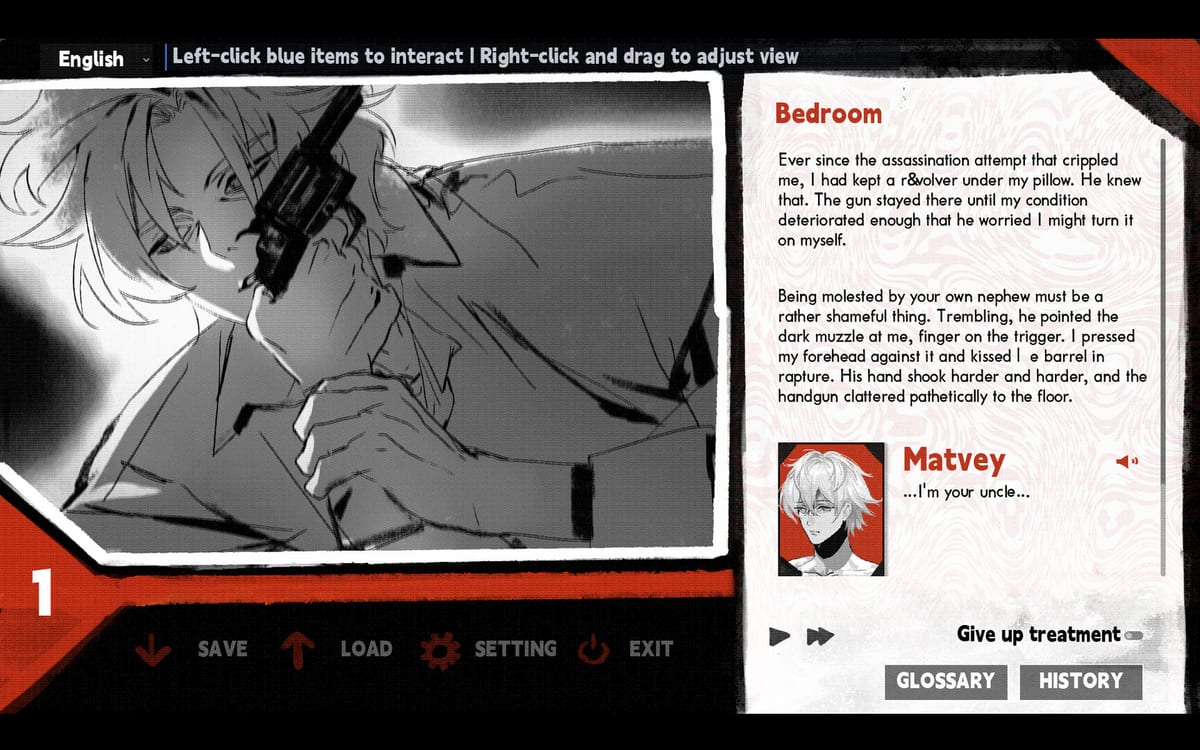
Dissolution of My Self looks like a quiet visual novel and plays like a locked-room investigation. You are not managing a party. You are not aiming a flashlight. You are clicking a foreign apartment until an exiled prince named Hector lets a memory surface—and then throws it away. This page is the onboarding checklist: input, settings, warnings, and the first hour of habits that keep you from bouncing off the demo.
If you want a route through the whole investigation, switch to the walkthrough after you finish this page. If you only care about what can be clicked, keep room objects nearby.
Before you click anything
Read the Steam content descriptors. Pop Elephant Studio lists self-harm, psychological manipulation, transgressive intimacy between relatives, regression, violence, substance misuse, visceral descriptions, and themes of trauma and exile. Later sequences use strong screen shake. Photosensitive players should sit farther from the monitor or skip those scenes. The developers have said this is not an eroge and still asked people not to play it in public. That combination is the tone: intimate, ugly, and loud in headphones even when the room looks ordinary.
The game is single-player, Windows only, released September 3, 2026 on Steam. Launch price was $5.99 with a 10% discount for the first two weeks. Minimum spec is Windows 10 and about 600 MB of RAM. A free demo exists on Steam and itch.io; compare builds on the demo guide.
Controls and why a mouse matters
itch.io comments and demo patch notes describe more than a simple left click. You will:
- Click hotspots on furniture, windows, screens, bottles, and papers.
- Drag, wipe, or hold during mini-interactions. Demo version 1.1.3 specifically fixed those gestures getting stuck.
- Long-press and scroll on at least one document-style object (a passport is the example players hit in the demo). A laptop trackpad can fail here. The developer replied that the demo required a mouse and that they would try to improve this for the full release.
If an object looks clickable and nothing happens, do not assume you are gated by story. Try a USB mouse, hold the button longer, and check whether the object already blurred on a previous click. Blurred objects are spent memories; they are not broken saves. The objects page explains that fade.
Save, load, and settings should not look clickable during dialogue. That was a demo bug and is worth knowing if you return to an older itch.io build. Title-screen settings and an EXIT path back to the title were added after Steam Next Fest feedback.
Settings that actually change the experience
Demo 1.0.8 added tools you should set before judging the writing:
- Text speed. English, Japanese, and Simplified Chinese text are all supported. If you are a fast reader, the full game can land under the advertised 3–4 hours.
- Character voice volume separate from other audio. Voices are Japanese even when the UI is English.
- Voice replay. Hector (Netoru Irakusa) and Matvey (Tetsuto Furukawa) are doing a lot of the emotional work. Replay a line before you decide it was a throwaway joke. The studio calls some of those jokes “straight from hell.”
- Fullscreen. An early demo bug failed to apply fullscreen; if your window snaps back while you drag a volume slider, you are on an old build. Check demo changelog.
Language is selected in the upper-left corner on the itch.io / demo presentation. Confirm it before you start a file you intend to keep. Character profiles exist and had a line-break bug that was later patched; if a biography looks clipped, update the build rather than assuming the writing is unfinished.
The investigation loop
- Look at the rented room. It is ordinary on purpose: window, television, dining chairs, medicine, furniture, papers.
- Click something Hector still recognizes.
- Watch or read a memory. Do not treat his narration as a court transcript. Official copy says his recounting depends on his state of mind.
- When the scene ends, that object begins to blur and lose function. You cannot keep using it as a prop forever.
- The apartment’s remaining text and usable hotspots shift. Demo notes mention room text changing for each layer.
- Repeat until there is nothing left to remember on purpose.
You cannot fail a skill check and get a game-over screen. You can get stuck on a gesture, miss a mini-game hint, or take pills versus refuse them. Those last two change how the collapse is staged. They do not unlock a second campaign. Read pills and choices before you empty the bottle, and endings if you are hunting routes.
First-session checklist
- Plug in a mouse.
- Set language, text speed, and voice volume.
- Read the warnings; this is uncle/nephew, king/vassal, caretaker/patient in one relationship. Hector and Matvey explain the roles without pretending they are healthy.
- Click a low-stakes object first (window or furniture) so you see the blur rule before you spend a story-heavy item.
- When a mini-game appears, look for the extra hints added after Next Fest. They are there because testers bounced.
- Save after a long memory. A demo crash on load was patched; still save like the game is an indie build, because it is.
Accessibility and comfort
There is no colorblind combat UI because there is no combat. The real barriers are reading, audio, motion, and subject matter. Font effects frustrated some demo players; the developer said they would think about a toggle. If text styling makes English hard, slow the text speed and rely on voice replay. If screen shake is the problem, this is not a “turn off gore” slider situation—plan a break.
Family Sharing is listed on Steam. That does not make the game family-friendly. It only means a household Steam library can pass the license around.
What to open next
Play thirty minutes. If the loop makes sense, continue with the walkthrough and tick items on room objects. If you are still deciding whether to buy, read the review and the launch notes. Official channels sit on Links. The memory order planner is optional until objects start disappearing faster than you can name them.
Dissolution of My Self is short. The getting-started mistake is treating it like a puzzle box with a hidden true ending. Treat it like a room you are emptying. The walkthrough will not give you a different finale. It will keep you from fighting the interface while Hector is trying to disappear.
Frequently Asked Questions
Quick answers to the most common questions.
Can I play Dissolution of My Self with a laptop trackpad?
The demo required a mouse for at least one long-press-and-scroll object. Use a mouse if a hotspot refuses to complete. See room objects if you think the item already blurred.
Is there combat or a fail state?
No combat, no jumpscares, no monster battles. You can stall on a gesture or pick pills versus no pills. Those choices change presentation, not a second ending. Details: pills and choices.
Which language should I use?
The game supports English, Japanese, and Simplified Chinese text with Japanese voices. This wiki is English and Japanese. Set the in-game language before a long session.
Where do I go after the first hour?
Follow the walkthrough, then endings if you are worried you missed a route.